
Accessibility Testing
Automated vs Manual Accessibility Testing: Which One Does Your Business Need?
Introduction
You’ve invested time and resources into building a modern website. It looks great, performs well, and passes basic quality assurance testing. So, does that mean it's accessible?
Not necessarily.
Many organizations believe that running an automated accessibility scanner is enough to identify every accessibility issue. Unfortunately, that's one of the biggest misconceptions in digital accessibility.
Automated tools are valuable—they can quickly identify many common accessibility problems. However, they only tell part of the story. Many of the barriers that affect real users can only be found through manual testing performed by experienced accessibility professionals.
Think of it this way: an automated tool is like a spell checker. It can identify spelling mistakes, but it can't tell whether your message makes sense or whether readers will understand it. In the same way, automated accessibility tools can detect certain technical issues, but they cannot fully evaluate how usable a website is for someone relying on a screen reader, keyboard navigation, or other assistive technology.
In this guide, we'll explain the differences between automated and manual accessibility testing, when each should be used, and why combining both approaches is the most effective way to improve digital accessibility.
Table of Contents
What Is Accessibility Testing?
Why Accessibility Testing Matters
What Is Automated Accessibility Testing?
Benefits of Automated Testing
Limitations of Automated Testing
What Is Manual Accessibility Testing?
Benefits of Manual Testing
Limitations of Manual Testing
Automated vs Manual Testing Comparison
Why You Need Both
Common Accessibility Issues Missed by Automated Tools
Best Practices for Accessibility Testing
Frequently Asked Questions
Final Thoughts
What Is Accessibility Testing?
Accessibility testing is the process of evaluating whether a website, web application, or mobile app can be used effectively by people with disabilities.
The goal is to identify barriers that prevent users from completing tasks such as navigating menus, reading content, filling out forms, or interacting with controls.
Accessibility testing typically measures compliance with accessibility standards such as WCAG 2.2 while also evaluating the real user experience.
A comprehensive accessibility assessment includes both automated testing and manual evaluation.
Why Accessibility Testing Matters
Accessibility problems often remain unnoticed because development teams test websites using standard devices, browsers, and input methods.
However, many users rely on:
Screen readers
Keyboard-only navigation
Voice control software
Screen magnifiers
Alternative input devices
High contrast settings
Without proper testing, these users may encounter barriers that make your website difficult—or even impossible—to use.
Accessibility testing helps organizations create more inclusive digital experiences while reducing usability issues and supporting compliance efforts.
What Is Automated Accessibility Testing?
Automated accessibility testing uses software tools to scan websites and identify technical accessibility issues.
These tools analyze the HTML, CSS, JavaScript, and page structure to detect violations of accessibility guidelines.
Common examples include:
Missing alternative text
Empty buttons
Form labels
Heading structure issues
Color contrast failures
Missing ARIA attributes
Duplicate IDs
Invalid HTML
Automated testing is fast, repeatable, and well suited for identifying common technical issues during development.
Benefits of Automated Accessibility Testing
Automated testing offers several advantages:
Fast Results
Large websites can be scanned quickly, helping teams identify issues early in the development process.
Easy Integration
Many automated tools integrate with development workflows, allowing accessibility checks during continuous integration and deployment.
Consistent Evaluation
Automated scans apply the same rules every time, making them useful for monitoring accessibility over time.
Cost-Effective for Early Detection
Finding technical issues early can reduce remediation costs later in the development lifecycle.
Limitations of Automated Accessibility Testing
Despite its benefits, automated testing has important limitations.
It cannot reliably determine:
Whether alternative text is meaningful.
Whether link text makes sense out of context.
Whether keyboard navigation is logical.
Whether focus order follows user expectations.
Whether error messages are understandable.
Whether instructions are clear.
Whether a screen reader provides a usable experience.
Whether dynamic content is announced correctly.
Whether forms are actually usable.
Automated tools may also report false positives or overlook issues that require human judgment.
What Is Manual Accessibility Testing?
Manual accessibility testing involves experienced testers evaluating a website using real user interactions and assistive technologies.
Instead of relying solely on software, testers assess how accessible and usable the website is from the perspective of different users.
Manual testing often includes:
Keyboard-only navigation
Screen reader testing
Zoom testing
Focus management
Form usability
Dialog and modal behavior
Error recovery
Mobile accessibility evaluation
Cognitive accessibility review
This approach helps identify issues that automated tools cannot detect.
Benefits of Manual Accessibility Testing
Manual testing provides valuable insights into the actual user experience.
It helps evaluate:
Real usability
Navigation flow
Screen reader compatibility
Logical reading order
Interactive components
Accessible authentication
User guidance
Content clarity
These factors play a critical role in creating inclusive digital experiences.
Limitations of Manual Accessibility Testing
Manual testing also has considerations.
It requires trained accessibility specialists.
Large websites take longer to evaluate.
The process is more detailed than automated scanning.
Specialized knowledge of accessibility standards and assistive technologies is essential.
However, the depth and quality of insights often justify the additional effort.
Why Your Business Needs Both
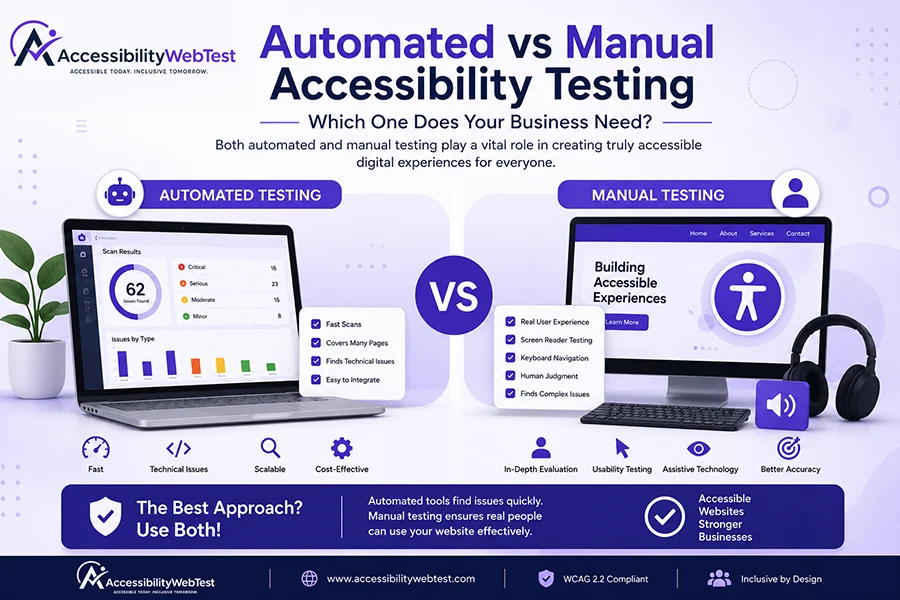
The most effective accessibility strategy combines automated and manual testing.
Automated tools quickly identify many technical issues, while manual testing evaluates the user experience and verifies compliance that software alone cannot assess.
Together, they provide a more complete understanding of your website's accessibility and help prioritize improvements that matter most to users.
Common Issues Missed by Automated Tools
Some accessibility barriers typically require manual evaluation, including:
Confusing focus order
Poor keyboard usability
Meaningless alternative text
Unclear instructions
Inconsistent navigation
Screen reader announcements
Accessible authentication flows
Modal dialog behavior
Dynamic content updates
Form error recovery
These issues can significantly impact usability even if an automated scan reports few problems.
Best Practices for Accessibility Testing
To improve accessibility effectively:
Test throughout development, not only before launch.
Combine automated and manual testing.
Evaluate with assistive technologies.
Prioritize high-impact issues.
Retest after remediation.
Include accessibility in ongoing quality assurance processes.
Accessibility should become part of your organization's regular development lifecycle.
Frequently Asked Questions
Can automated tools find every accessibility issue?
No. Automated tools identify many technical issues but cannot fully evaluate usability or user experience.
Is manual accessibility testing necessary?
Yes. Manual testing is essential for identifying issues that require human judgment, such as screen reader usability, keyboard navigation, and content clarity.
How often should accessibility testing be performed?
Accessibility should be evaluated throughout design, development, before major releases, and after significant content or feature updates.
Which testing method is better?
Neither method replaces the other. Combining automated and manual testing provides the most comprehensive accessibility assessment.
Final Thoughts
Accessibility testing is about much more than checking boxes or generating compliance reports. It is about understanding how real people interact with your website and removing barriers that prevent them from accessing your products, services, and information.
Automated testing provides speed and efficiency, while manual testing provides context, usability insights, and confidence that your website truly works for everyone.
Organizations that invest in both approaches are better positioned to deliver inclusive digital experiences and maintain accessibility over time.
How AccessibilityWebTest Can Help
At AccessibilityWebTest, we combine automated accessibility scans with comprehensive manual testing performed by experienced accessibility professionals.
Our services include:
Website Accessibility Testing
Manual Accessibility Testing
Mobile Accessibility Testing
WCAG 2.2 Compliance Audits
Section 508 Testing
GIGW 3.0 Testing
Accessibility Consulting
Accessibility Remediation Guidance
Whether you're launching a new website or improving an existing one, we help you identify accessibility barriers, prioritize fixes, and build digital experiences that work for everyone.